> For the complete documentation index, see [llms.txt](https://docs.sandbox.com.vn/llms.txt). Markdown versions of documentation pages are available by appending `.md` to page URLs; this page is available as [Markdown](https://docs.sandbox.com.vn/8.-nhan-su/8.2-quan-ly-nhan-vien/8.2.3-bao-cao-hoa-hong/bao-cao-theo-chi-tiet-don-hang.md). Agents can also search and read this documentation through its [MCP server](https://docs.sandbox.com.vn/~gitbook/mcp).

# Báo cáo theo chi tiết đơn hàng

Báo cáo chi tiết đơn hàng giúp doanh nghiệp có thể theo dõi hoa hồng một cách chính xác cho từng nhân viên dựa trên doanh số bán hàng của họ, tránh sai sót và tranh chấp trong cách tính.

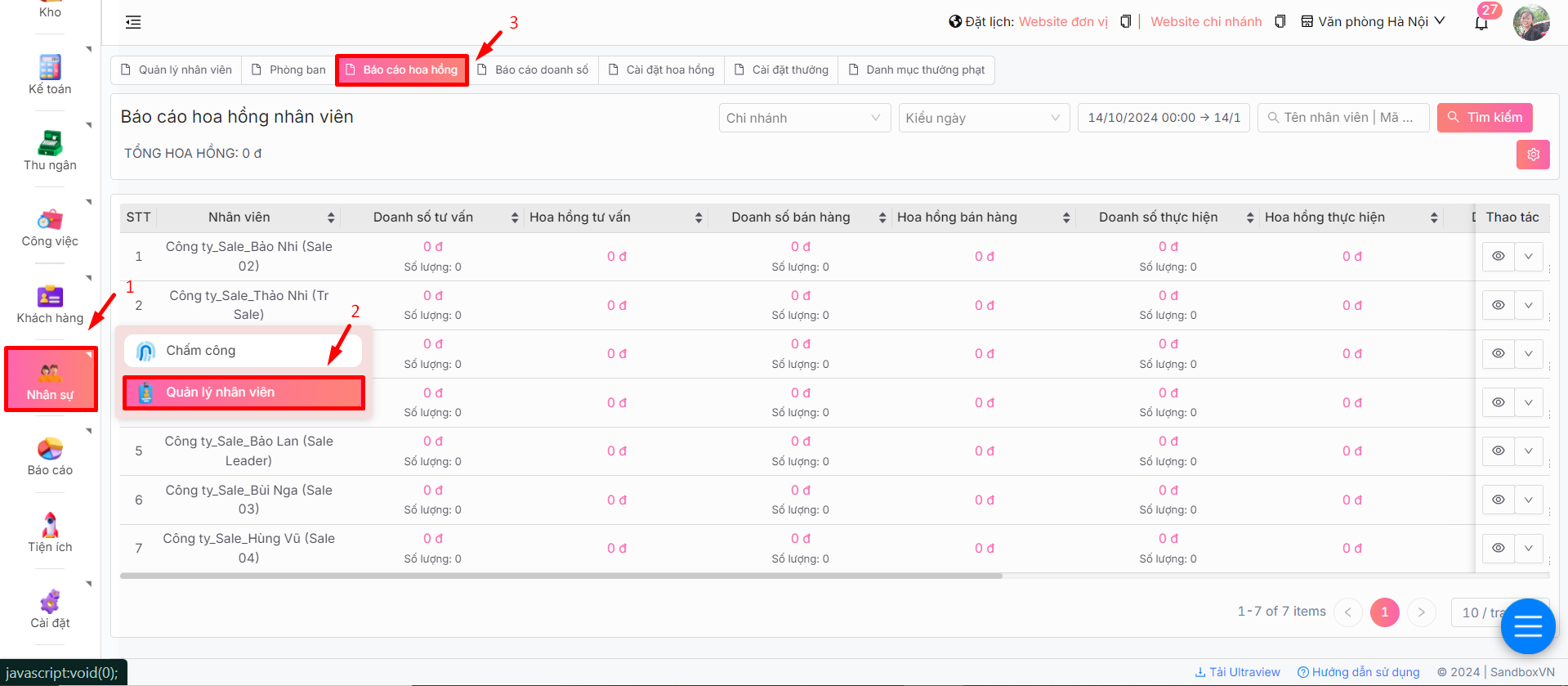
1. Sau khi đăng nhập thành công, tại thanh menu chọn **Nhân sự** -> **Quản lý nhân viên** -> **Báo cáo hoa hồng**

<figure><img src="https://46536393-files.gitbook.io/~/files/v0/b/gitbook-x-prod.appspot.com/o/spaces%2FKnaMljuquxKOnflZEqLy%2Fuploads%2F0eUE4ZypWYbisGj49HL6%2Fimage.png?alt=media&amp;token=f46589d5-c858-4bb0-814a-4f50fb662d98" alt=""><figcaption></figcaption></figure>

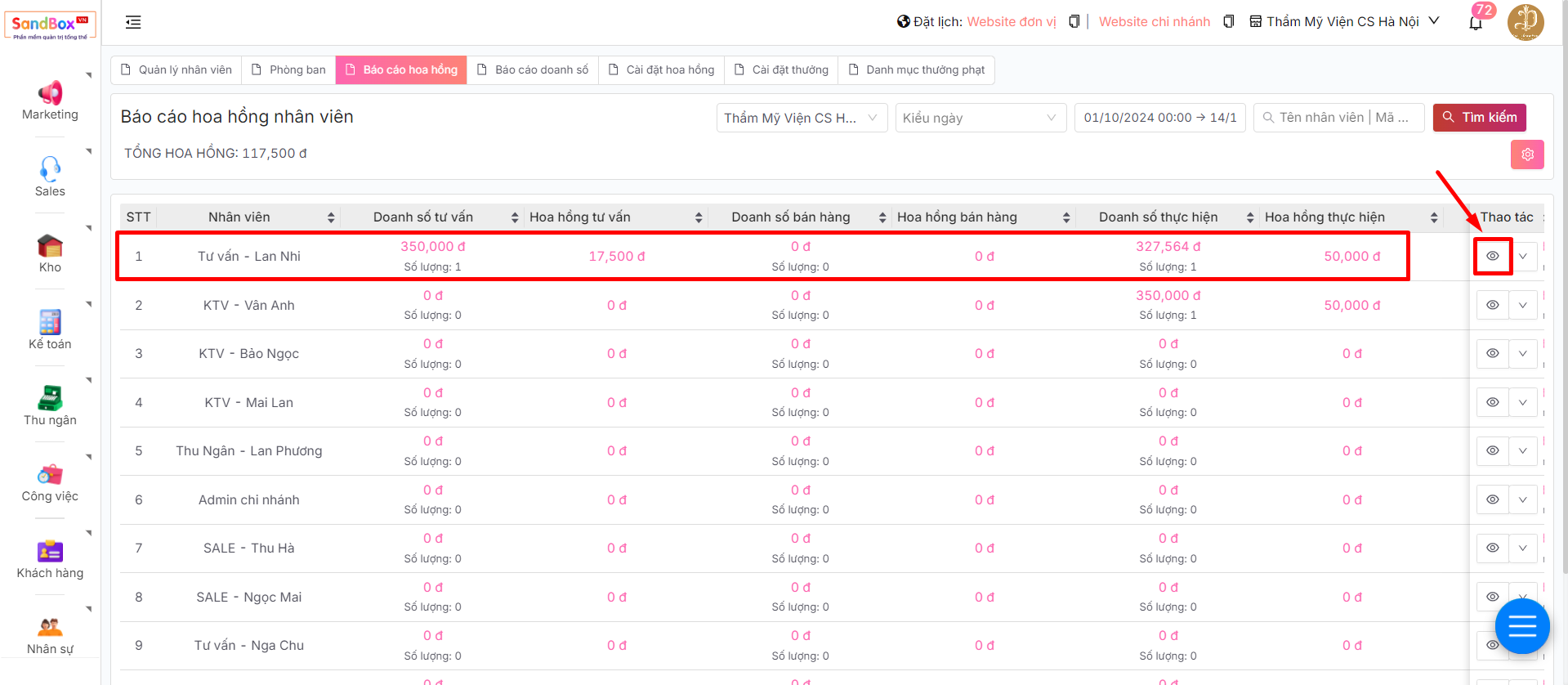
2. Xem báo cáo theo chi tiết đơn hàng của một nhân viên bằng cách nhấn vào nút <img src="https://content.gitbook.com/content/KnaMljuquxKOnflZEqLy/blobs/apsLhC3jVWhCOcqfjQFL/image.png" alt="" data-size="line"> tương ứng với nhân viên muốn chọn.

<figure><img src="https://46536393-files.gitbook.io/~/files/v0/b/gitbook-x-prod.appspot.com/o/spaces%2FKnaMljuquxKOnflZEqLy%2Fuploads%2FM0keTDeYdlhJVLdgCTkw%2Fimage.png?alt=media&amp;token=1067cd63-2f77-4743-90ea-d509dcef87ff" alt=""><figcaption></figcaption></figure>

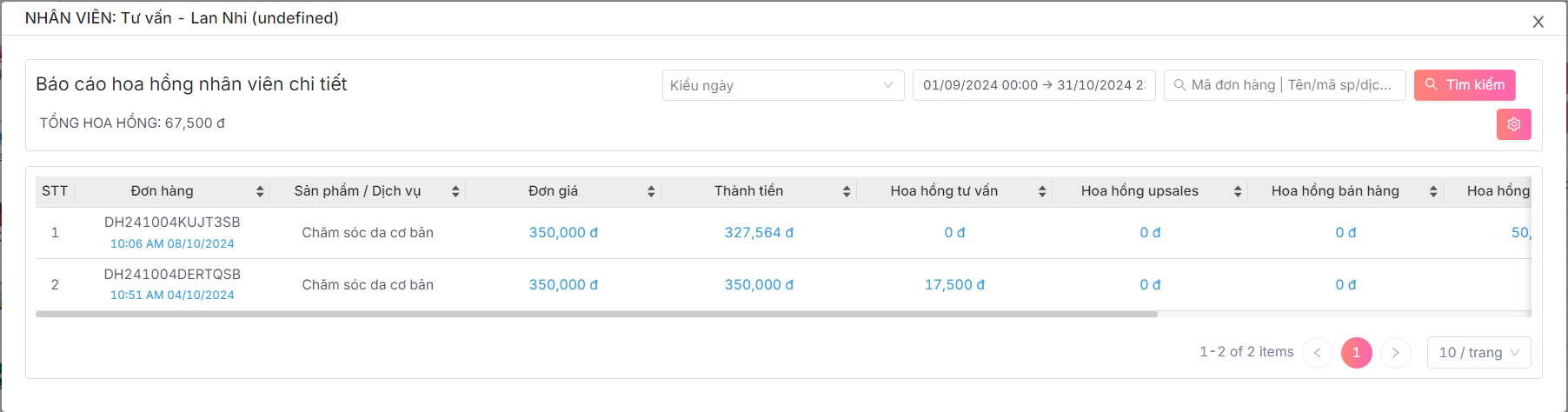
Màn hình hiển thị chi tiết doanh thu hoa hồng của nhân viên theo từng đơn hàng thực hiện thành công giúp doanh nghiệp dễ dàng theo dõi

<figure><img src="https://46536393-files.gitbook.io/~/files/v0/b/gitbook-x-prod.appspot.com/o/spaces%2FKnaMljuquxKOnflZEqLy%2Fuploads%2F608lVp1lo9WzRAQWP5NB%2Fimage.png?alt=media&amp;token=a859e844-8d05-4d1b-81bb-c711218b3308" alt=""><figcaption></figcaption></figure>

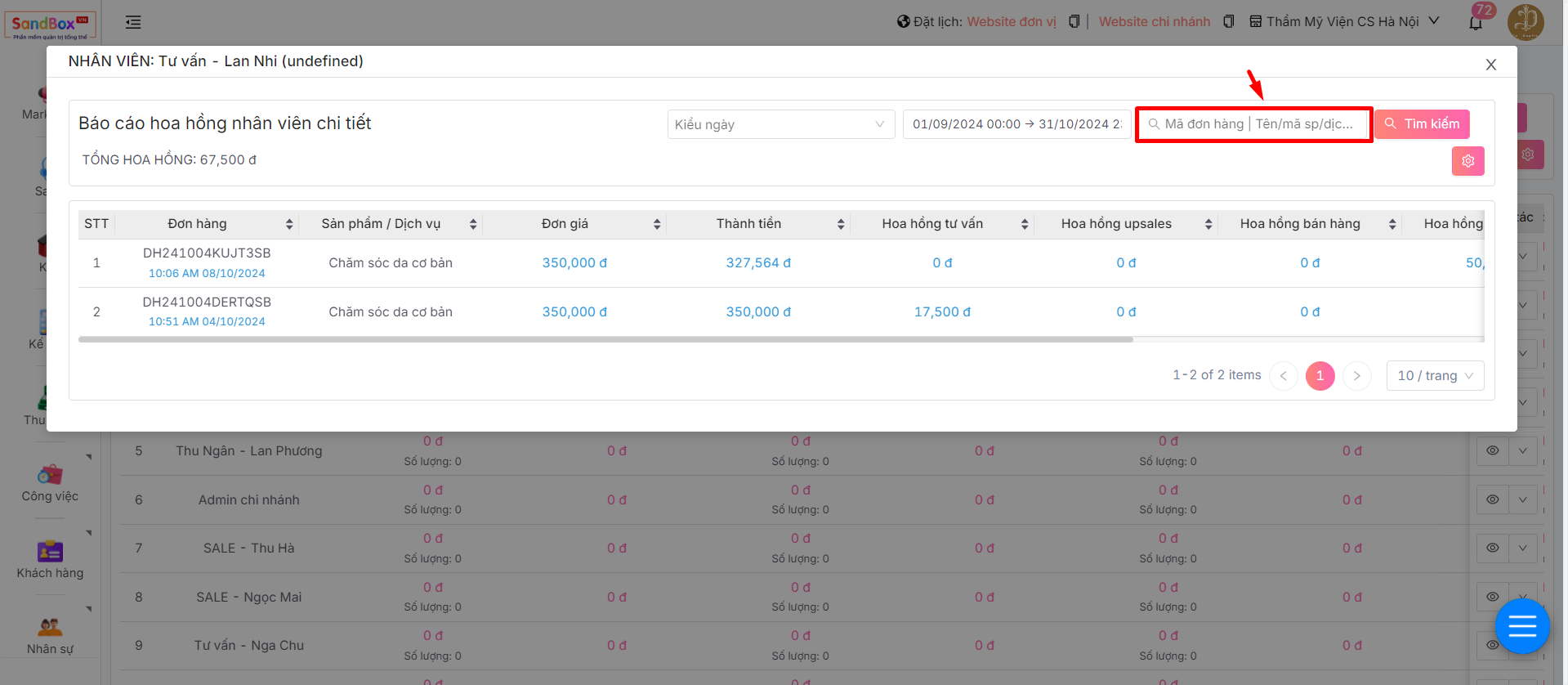
3. Để tìm kiếm đơn hàng bất kì, nhập mã đơn hàng hoặc tên/mã sản phẩm, dịch vụ vào ô như trên màn hình và ấn nút <img src="https://46536393-files.gitbook.io/~/files/v0/b/gitbook-x-prod.appspot.com/o/spaces%2FKnaMljuquxKOnflZEqLy%2Fuploads%2FUPOSODdOpdLsPml3Oq2z%2Fimage.png?alt=media&amp;token=77693c18-3618-4df9-a74f-b9026aa315ad" alt="" data-size="line">

<figure><img src="https://46536393-files.gitbook.io/~/files/v0/b/gitbook-x-prod.appspot.com/o/spaces%2FKnaMljuquxKOnflZEqLy%2Fuploads%2FKRewV8GyQlRVXwZ6OwcN%2Fimage.png?alt=media&amp;token=3c4bb7ea-8cdb-45e0-9a15-8b6e31c4c6bf" alt=""><figcaption></figcaption></figure>

{% hint style="info" %}
**Lưu ý:** Lọc các đơn hàng theo thời gian nhấn vào ô <img src="https://content.gitbook.com/content/KnaMljuquxKOnflZEqLy/blobs/iFrvMcN9wa6j2jChPY2i/image.png" alt="" data-size="line"> để tùy chỉnh
{% endhint %}