# 3.3.3 Báo cáo sản phẩm bán

Vào menu chọn **Kho => Quản lí hàng tồn kho => Báo cáo sản phẩm bán**

<figure><img src="https://46536393-files.gitbook.io/~/files/v0/b/gitbook-x-prod.appspot.com/o/spaces%2FKnaMljuquxKOnflZEqLy%2Fuploads%2FiIngWRlYi9WjKX2tKoxI%2Fimage.png?alt=media&#x26;token=13466ea4-b78b-485e-a22c-a3fa6bf0b34d" alt=""><figcaption></figcaption></figure>

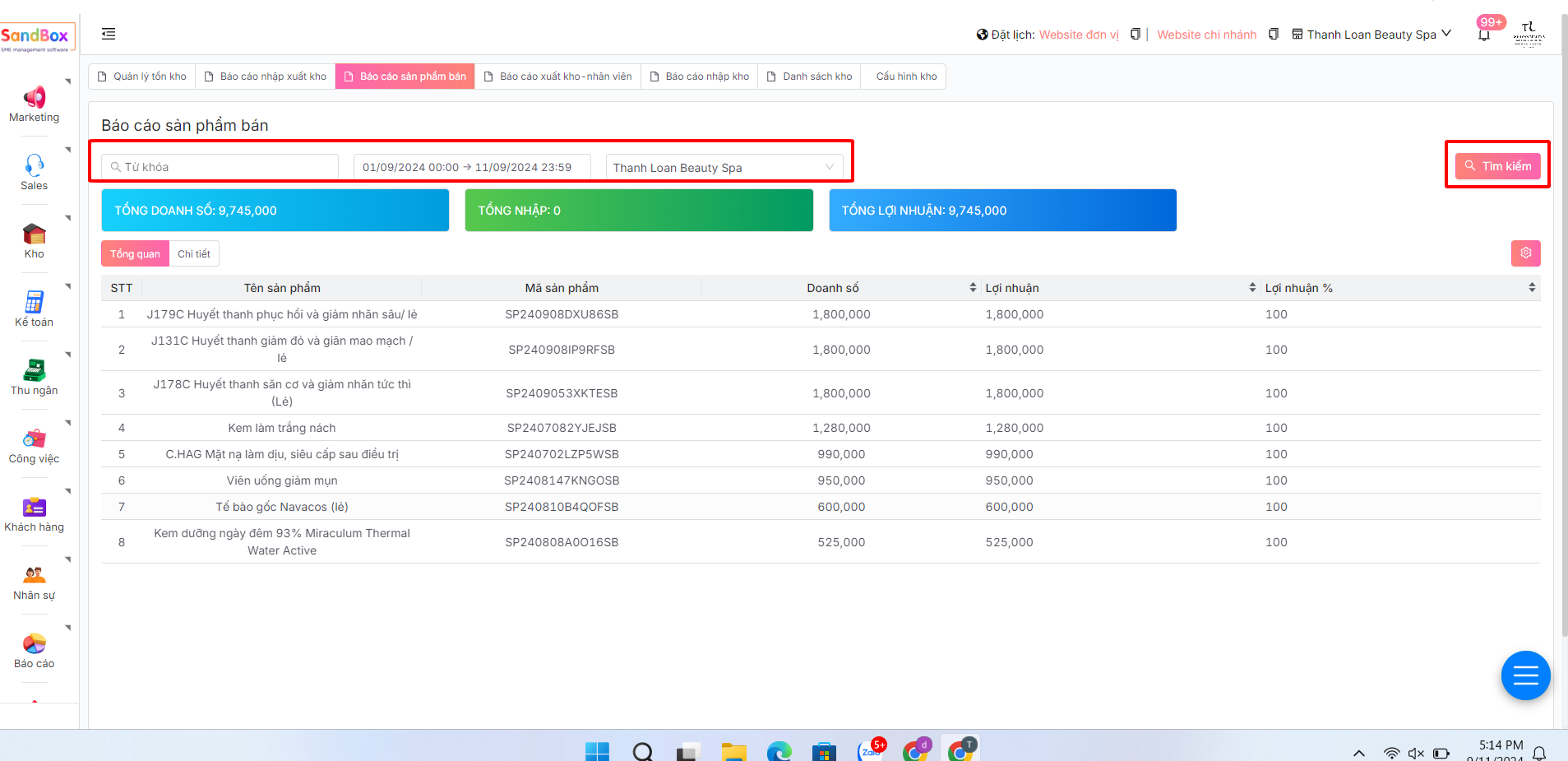
Có thể tìm kiếm từ khoá, lọc thời gian, lựa chọn chi nhánh xem => sau đó ấn T**ìm kiếm**&#x20;

<figure><img src="https://46536393-files.gitbook.io/~/files/v0/b/gitbook-x-prod.appspot.com/o/spaces%2FKnaMljuquxKOnflZEqLy%2Fuploads%2F0W2RUeoBUOG7Ge9Z4ejW%2Fimage.png?alt=media&#x26;token=63bb8a4d-76dd-429a-9fbf-a9d60a9383a3" alt=""><figcaption></figcaption></figure>

Theo dõi được các chỉ số về tổng doanh số, tổng nhập, tổng lợi nhuận&#x20;

<figure><img src="https://46536393-files.gitbook.io/~/files/v0/b/gitbook-x-prod.appspot.com/o/spaces%2FKnaMljuquxKOnflZEqLy%2Fuploads%2FbzVCCkUPojucXqiGZ3oy%2Fimage.png?alt=media&#x26;token=460ae21c-3f09-4d3f-9536-e1cc53f41be1" alt=""><figcaption></figcaption></figure>

Ở mục xem tổng quan xem được các thông tin tổng quan về Doanh số, Lợi nhuận, % Lợi nhuận&#x20;

<figure><img src="https://46536393-files.gitbook.io/~/files/v0/b/gitbook-x-prod.appspot.com/o/spaces%2FKnaMljuquxKOnflZEqLy%2Fuploads%2FUkBN6GjhzAdxI5I7vMMk%2Fimage.png?alt=media&#x26;token=c315a523-6a61-4945-b5b7-ad6e70d63bab" alt=""><figcaption></figcaption></figure>

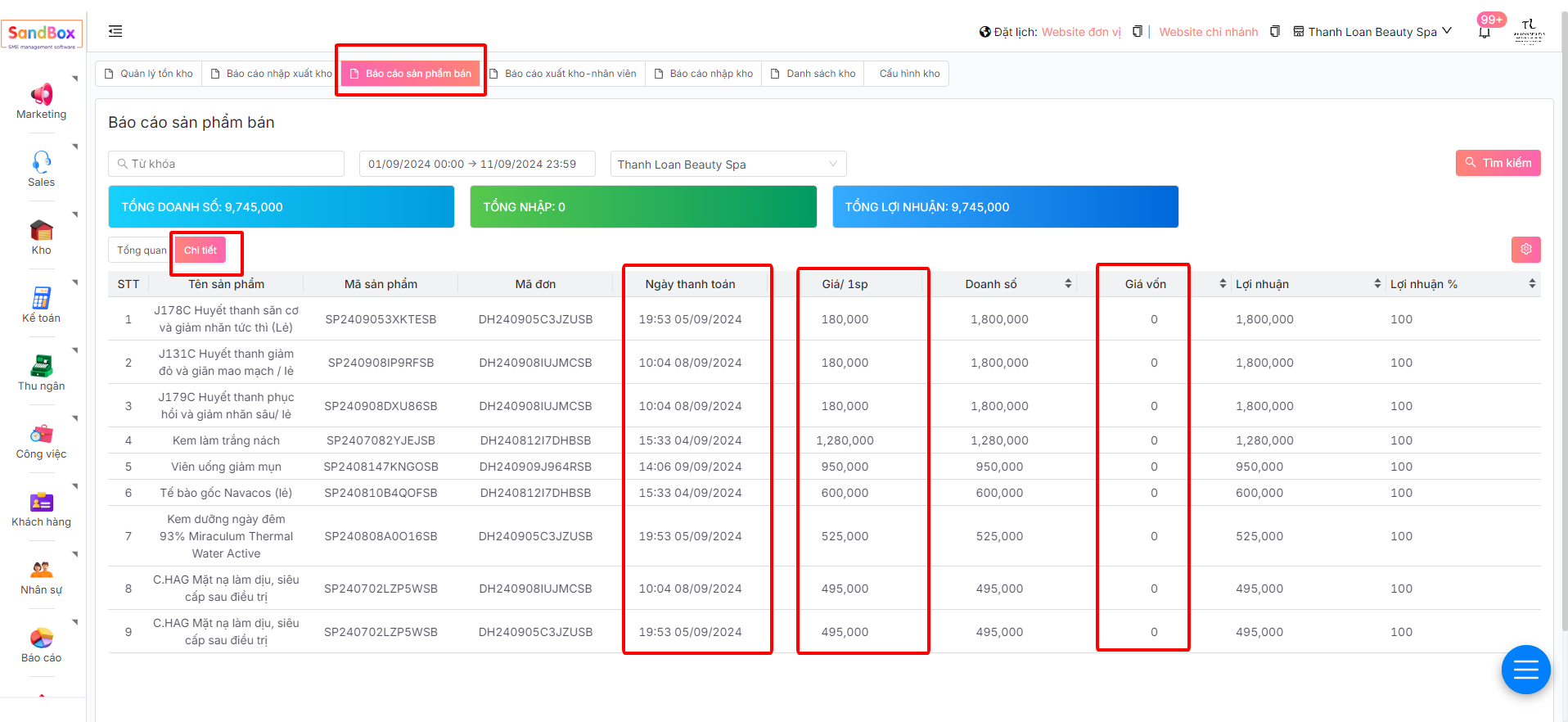
Ở phần chi tiết xem được chi tiết hơn về: Ngày thanh toán, Giá/1sp, Giá vốn

<figure><img src="https://46536393-files.gitbook.io/~/files/v0/b/gitbook-x-prod.appspot.com/o/spaces%2FKnaMljuquxKOnflZEqLy%2Fuploads%2F3XrX9zCIp2OFCT5nWLgi%2Fimage.png?alt=media&#x26;token=cae32cbb-10b9-4f70-9839-e7d8432ce655" alt=""><figcaption></figcaption></figure>